
Willpower is a finite resource that you're currently wasting on a losing battle against notifications. You've tried the standard apps that block apps iphone users typically rely on, but you know the "Ignore Limit" button is a trap you fall into every single day. It's a fake barrier. It offers the illusion of discipline without the enforcement required for deep work. You don't need another suggestion. You need a lock that you cannot pick.
We've vetted the top solutions for 2026, focusing on tools that prioritize accountability over convenience. You'll discover how to transform your device into a work-only machine that refuses to unlock until you prove your tasks are complete. This isn't about being mindful. It's about being disciplined through structure. This guide focuses on results, not intentions.
We'll examine the latest hard-blocking technology, from friction-based pauses to mandatory task verification. By the end of this guide, you'll have a clear roadmap to lock down your digital environment and reclaim hours of lost productivity. You will learn to stop fighting your phone and start controlling it.
Key Takeaways
- Stop relying on willpower and learn why hard blocking is the only way to eliminate the "Ignore Limit" trap.
- Master the latest Screen Time API technology to implement system-level shields using the most effective apps that block apps iphone.
- Audit your digital environment to identify the distractions stealing 80% of your time and execute a "No-Escape" session.
- Define strict "Exit Criteria" that require tangible proof before you are allowed to access non-work tools.
- Leverage verification-based locking to ensure your phone remains a tool for production rather than a source of consumption.
Why Standard iPhone Focus Modes and Basic Blockers Fail
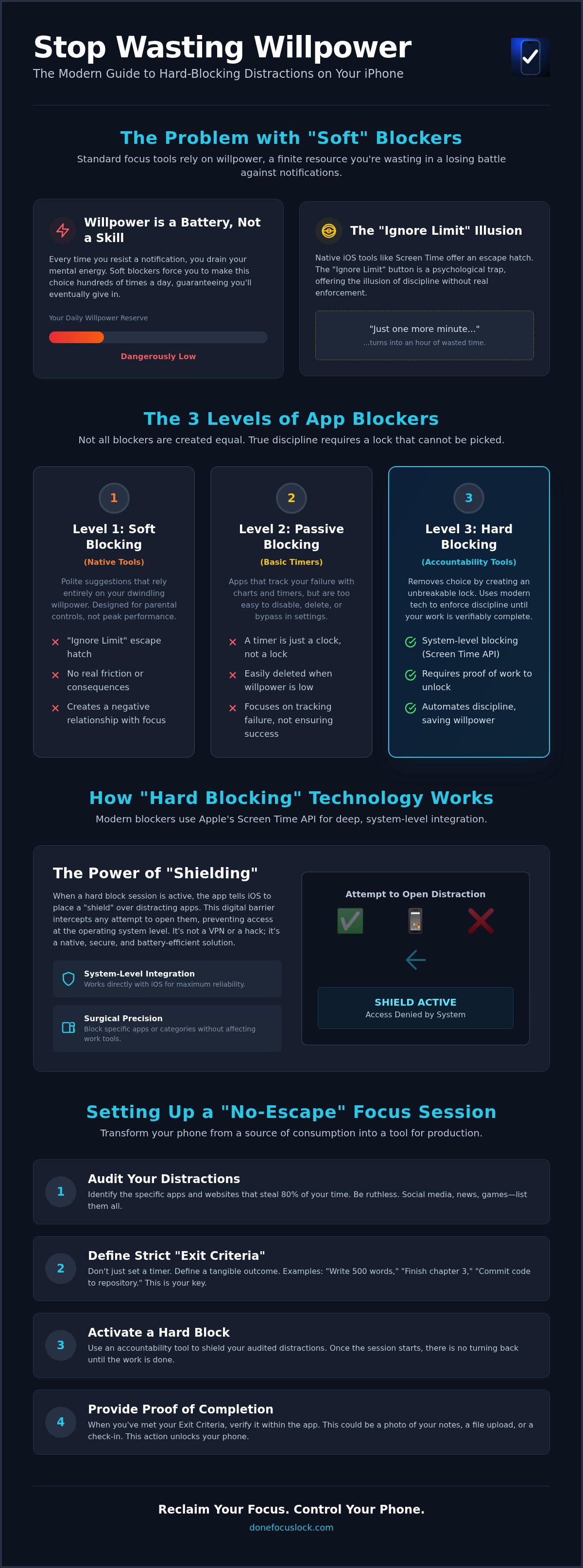
Most digital tools are built for convenience. Real discipline is inconvenient. You've likely tried every built-in setting on your device. They fail because they rely on 'soft blocking.' A soft block is a polite suggestion. It asks you to stop scrolling. A 'hard block' is a physical enforcement. It stops you. Your brain knows the difference. When you use standard apps that block apps iphone users often download, you're just negotiating with your own impulses. You'll lose that negotiation every single time.
Willpower is a finite resource. It's a battery that drains throughout the day. When a distraction is only two taps away, you're forcing your brain to make a constant choice. Should I work or should I check my notifications? Every time you make that choice, you drain your focus. Effective blocking removes the choice entirely. It automates your discipline so your willpower can be spent on the work itself, not on resisting the phone.
The Problem with Native iOS Screen Time
Apple's native tools were originally designed as parental control features to monitor children. They weren't built for high-performance adults seeking deep work. The 'Ignore Limit' button is a psychological trap. It offers a 'One More Minute' option that inevitably turns into an hour of wasted time. Because there is no real friction to disabling these limits, your willpower evaporates the moment you feel a hit of boredom. You need a system that closes the back door.
Native settings also lack a reward mechanism. They focus on restriction without acknowledging completion. There is no sense of achievement when a timer expires; there is only the annoyance of the block. This creates a negative relationship with your device. You start to view your focus tools as an enemy to be bypassed rather than a partner in your success. High-performance blocking should feel like a trade: you give the work, and the system gives you back your digital freedom.
The Illusion of Productivity Apps
The market is flooded with 'productivity' apps that only track your failure. They show you charts of how much time you wasted. This is passive blocking. It treats your distraction like background noise. A timer is just a clock; it doesn't prevent you from opening a restricted app. If a blocker can be bypassed by a simple toggle in your settings, it isn't a tool for focus. It's a suggestion. True discipline requires a lock that stays shut until the work is done. You don't need more data. You need more resistance.
Many third-party apps that block apps iphone users rely on are too easy to delete. When the urge to scroll becomes intense, a weak app is the first thing to go. You need a solution that establishes external accountability. This means a system that cannot be negotiated with, even when you're at your most impulsive. You need a coach that says 'no' and means it.
How iOS App Blocking Technology Works in 2026
Modern productivity requires more than just a timer. In 2026, the most effective apps that block apps iphone users rely on utilize Apple's Screen Time API. This technology allows developers to create system-level restrictions that are deeply integrated into iOS 27. When you initiate a focus session, the software doesn't just track your time; it actively communicates with the operating system to prevent specific applications from launching. This is the foundation of high-performance discipline.
The core mechanism is called "shielding." When a shield is active, the operating system places a digital barrier over restricted apps. If you attempt to tap a blocked icon, the OS intercepts the request and displays a custom interface instead. This happens locally on your device. It's a privacy-first approach. The blocking app never sees your personal data, messages, or browsing history. It simply tells the iPhone which categories or specific apps are off-limits. However, you must remember that shields primarily stop you from opening apps. They don't always stop incoming notifications unless you've paired them with a system Focus Mode. You must configure both for total silence.
Shielding vs. Network Blocking
Older blocking methods used DNS or VPN-based filtering to cut off internet access. These were unreliable and heavy on battery life. They also failed to block offline features like your photo gallery or downloaded games. Modern API-based shielding is superior because it targets the application itself, not just the data it consumes. This allows for surgical precision. You can block social media while keeping your work-related communication tools fully functional. Because this process is native to the iOS ecosystem, it consumes negligible power. If you want a tool that leverages this precision to enforce real accountability, you should explore Done: Focus Lock for your workflow.
The Role of Device Management (MDM) in Strict Blocking
Some "hard" blockers take a more aggressive route by using Mobile Device Management (MDM) profiles. These are enterprise-grade tools usually reserved for corporate-issued phones. MDM profiles can disable the App Store, prevent app deletion, or even lock down the Settings menu. While this offers the highest level of restriction, it comes with risks. You are essentially giving a third-party app deep control over your entire device. For most high-performers, standard API blocking is the safer and more flexible choice. It provides the necessary friction without compromising the integrity of your iPhone's security. Stick to the API unless your lack of discipline is a genuine emergency.
Comparing the 3 Levels of App Blockers for iPhone
Most people fail to focus because they use the wrong level of resistance. You must match the strength of the blocker to the strength of your distraction. If you're fighting a social media addiction, a simple timer is like bringing a toothpick to a sword fight. You need to understand the hierarchy of apps that block apps iphone to choose the right tool for your specific needs. Discipline isn't about trying harder. It's about building better walls.
Level 1 & 2: When Willpower is Still Required
Level 1 blockers are "Reminders." These include native Screen Time settings and basic Pomodoro timers. They're effective for tracking how you spend your time, but they offer zero enforcement. They rely entirely on your internal discipline. Level 2 blockers are "Pausers." These apps introduce a short delay or a mindful breathing exercise before an app opens. They're excellent for breaking the habit of mindless tapping. However, both levels share a fatal flaw: they're easily ignored. If you're "doomscrolling" at 2:00 PM, a five-second pause won't stop you. You'll just wait out the clock.
This often leads to "fake productivity." You spend more time organizing your beautiful timers and color-coding your focus sessions than actually working. When a distraction is only two taps away, your brain will find a way to justify the bypass. These levels are for those with mild habits. If you've ever hit "Ignore Limit" more than once in an hour, you've already outgrown Level 1 and 2. You need a system that removes the option to fail.
Level 3: The Verified Output Model
Level 3 blockers are "Enforcers." This is the highest tier of digital discipline. These apps don't just ask you to stop; they require evidence that you've finished your work before they release the lock. This is the core philosophy behind Done: Focus Lock. By removing the "Ignore" option, the psychological shift is immediate. You move from "I want to stop scrolling" to "I must finish this task to unlock my phone." It turns your device into a vault that only opens with proof of effort.
- Mandatory Verification: You cannot manually unlock your apps. The only key is your output.
- Physical Evidence: Uploading a photo of your handwritten notes or a file of your finished report creates a tangible link between effort and reward.
- Dopamine Realignment: Instead of a hollow hit from a notification, you get a genuine sense of accomplishment from submitting your work.
This model eliminates the "just one more minute" trap. It forces you to confront your tasks head-on. When the apps that block apps iphone use verification, they act as a disciplined coach rather than a passive observer. You aren't just blocking a distraction. You're enforcing a result. If you cannot produce the proof, the apps remain blocked. There is no negotiation.
Step-by-Step: Setting Up a "No-Escape" Focus Session
Setting up a "No-Escape" session is a tactical operation. You don't "try" to focus. You engineer an environment where work is the only path forward. Many apps that block apps iphone users download fail because they lack specific constraints. You must be ruthless. You must be precise. This process transforms your phone from a source of distraction into a dedicated tool for production.
Identifying Your Core Distractions
Start with a data-driven audit of your habits. You cannot fix what you don't measure. Open your Settings and navigate to Screen Time. Review your "Last 7 Days" of usage to find your biggest time sinks. Follow these steps to prepare your block list:
- Identify the Top 3: Find the three apps that steal 80% of your attention.
- Categorize the Apps: Distinguish between Utility apps and Vampire apps.
- Define the Vampire: A Vampire app is any application that provides zero ROI for your time while actively draining your cognitive energy.
- Mark for Shielding: Add these distractions to your restricted list immediately.
Executing the Session
Define your Exit Criteria before you hit start. This is your finish line. It must be a tangible result. If you are coding, your criteria is a successful commit. If you are reading, it is a one-page summary. Vague goals lead to failure. You need a specific physical artifact that proves the work happened. This artifact is the only key that will unlock your device. Clear your physical workspace. Your desk must match your digital state. Remove any secondary screens or tablets that could offer an easy out.
Set your focus timer between 25 and 90 minutes. This window is the sweet spot for deep work. Once you initiate the lock, the negotiation ends. Your iPhone will now refuse to open restricted apps until the timer expires and you provide proof. When using apps that block apps iphone, the verification step is the most important part of the workflow. You can start your first session with Done: Focus Lock to enforce this standard immediately. Commit to the output. When the timer ends, verify your work by uploading the file or photo. Only then is your digital freedom earned.
Done: Focus Lock - The Ultimate Accountability Partner
Done: Focus Lock is not a passive monitor. It is a tool designed for people who have outgrown the limitations of standard apps that block apps iphone. Intention is worthless without execution. Most blockers fail because they leave a back door open. Done: Focus Lock closes that door and locks it. It forces a direct confrontation with your output. There is no manual bypass. There is no "one more minute." There is only the work. This system is for those who are tired of failing their own expectations. It's for the professional who needs to produce, not just plan.
Manual unlocking is not a feature because it's the primary cause of failure in other systems. If you can turn the block off when things get difficult, you haven't really blocked anything. You've just set a reminder that you're about to ignore. Done: Focus Lock removes that weakness. If you can't produce the work, you don't get the phone. It's a simple, binary system that mirrors the reality of high-level performance. You either deliver or you remain locked out.
The Power of Visual Verification
The core of the system is the Proof of Completion. Most apps that block apps iphone rely on a clock to tell you when you're finished. Done: Focus Lock relies on evidence. When you finish a task, you must upload a photo or a file to release the shield. This physical act of verification reinforces your habit loop. It provides a tangible reward for your effort. If you're a writer, upload the draft. If you're a student, take a photo of your solved equations. The app acts as a disciplined coach, holding you to the standard you set for yourself. It ensures that professional tasks are completed, not just scheduled. This isn't about tracking time; it's about verifying results. You're building a history of proof that you can do what you say you'll do.
Getting Started with Done: Focus Lock
Efficiency is the goal. You can set up your first focus session in under 60 seconds. Select your "Vampire" apps, set your timer for a deep work block, and commit to your exit criteria. The verification loop ensures your output remains high throughout the day. This app is built exclusively for the iPhone and iPad ecosystem to leverage the most robust system-level shields available. It is for high-performers who value their time too much to waste it on negotiations with their own impulses. There is no Android or desktop version because we focus on the device where distractions are most lethal. You don't need a passive tracker. You need an accountability partner that refuses to back down. Stop scrolling and start working with Done: Focus Lock.
Reclaim Your Attention with Enforced Discipline
Discipline is a choice made through structure. You've learned why native tools fail and how modern shielding technology provides a real lock for your attention. Soft blocking is for the uncommitted. If you want results, you must move to the verified output model. This is the only effective way to evaluate apps that block apps iphone. By requiring physical proof before unlocking, you eliminate the negotiation with your own impulses.
You've seen how to transform your phone into a high-performance tool that serves your goals instead of draining your time. It's time to stop fighting your device and start controlling it. Use a system built for deep work that demands accountability through verification-based unlocking. Download Done: Focus Lock for iPhone to implement a strict accountability system that works as hard as you do. You've identified your distractions and defined your exit criteria. Now, lock the door. You are ready to produce.
Frequently Asked Questions
Can I bypass the app block if I really need to?
No, you cannot manually bypass the block. The system is designed to eliminate the "Ignore Limit" trap found in other apps that block apps iphone. You must provide the proof of work you defined at the start of the session. This strictness ensures you stay focused on your deep work. If you could bypass it, the tool would be useless. Discipline requires a lock that stays shut.
Will blocking apps on iPhone delete my data or messages?
Blocking apps does not delete any of your data, messages, or files. The technology uses Apple's Screen Time API to "shield" the application, which simply prevents it from opening. Your notifications and messages will still be there once you complete your task. It's a temporary restriction of access, not a removal of content. Your information remains safe and untouched on your device until the lock is released.
Does Done: Focus Lock work on iPad as well as iPhone?
Yes, the app is fully compatible with both iPhone and iPad. It's designed specifically for the Apple ecosystem to ensure the most reliable blocking experience. You can enforce the same high-performance standards across all your mobile devices. Whether you're writing on an iPad or managing tasks on your iPhone, the verification-based system remains consistent. It turns every Apple device into a dedicated, distraction-free workstation.
Is there an Android version of Done: Focus Lock available?
No, there is currently no Android version available. We focus exclusively on the iOS and iPadOS platforms to provide the deepest integration with system-level shields. This allows us to maintain a "no-escape" environment that is harder to circumvent. The most effective apps that block apps iphone users trust must be optimized for the specific hardware. We have built our technology specifically for the Apple devices you use for production.
Can I block specific websites as well as apps?
The system is designed to block specific applications that drain your productivity. While it focuses on shielding apps, you can restrict access to social media and other Vampire platforms that you access through your mobile browser. By selecting the right categories during your setup, you ensure that your iPhone becomes a tool for work rather than a portal for mindless browsing. You control the boundaries of your digital environment.
What happens if I cannot provide proof of work during a session?
If you cannot provide proof of completion, the apps remain blocked until you upload the required evidence. There are no excuses in this system. If you set a task, you must finish it. This consequence forces you to be realistic about your goals before you start. The lock is a commitment to your own productivity. You must produce the result to earn the reward of digital freedom.
How does task verification improve my productivity over time?
Task verification rewires your brain to associate completion with relief and reward. Instead of getting a cheap dopamine hit from a notification, you get a genuine sense of achievement from uploading your work. Over time, this builds a "proof of work" habit. You stop negotiating with distractions because you know the lock is absolute. Your focus sessions become longer and your output becomes more consistent and valuable.
Is my data and photo proof private when using Done?
Your privacy is a priority. The photo or file proof you upload is used solely for the purpose of verifying your task completion within the app. We use a privacy-first approach that leverages local device processing where possible. We don't sell your data or monitor your personal messages. The app functions as a private coach, not a surveillance tool. Your evidence of work is yours alone and remains secure.